Git
Data Model
-
Object := (sha1) -> (headers, body)
-
The sha1 is always the full content hash (headers + body) and thus is a signature of the object and dependent objects.
-
On forging: SHA-1 collisions are practical. In 2017 the SHAttered attack (Google and CWI Amsterdam) produced two different files sharing the same SHA-1, so a blob can in principle be crafted to collide with another. A commit still cannot be altered silently: changing it changes its hash, and because every descendant stores its parent’s hash, rewriting one commit forces every later commit to change too, which is what makes mid-history tampering visible. Modern git ships a hardened SHA-1 (the sha1dc collision detector, on by default) that aborts when it sees a SHAttered-style collision attempt, and an experimental SHA-256 object format exists for new repositories.
-
-
Commit (Object)
A commit represents a snapshot of files, in a time-like topology that cannot determine “time” for sure, but that has the notion of ancestors and descendants, so one can follow the logical history of changes.
Example:
tree 0fdc764f4c477e55f9326b1340af175cd823518c
parent 723781bf7cc1a6eb8bdecd987975b8af7ed960bb
author Romain Dorgueil <romain@dorgueil.net> 1459760873 +0200
committer Romain Dorgueil <romain@dorgueil.net> 1459760873 +0200

commit message is the body
Headers:
treeis the root tree describing this commit’s snapshot content. There needs to be one, and only one.parentrepresents one of this commit’s ancestors. There can be 0, 1 or more parents (0 is first commit in a given history, 1 is normal/most common commit, more than one is merge commit, a.k.a. a commit that makes two or more divergent histories converge).authorandcommitterheaders represent the author and committer of the commit (what a surprise), along with the time at which the event happens. Mostly provided as information, can not and should not be trusted unless you trust the person that provided the information.
-
Tree (Object)
A tree has no header, only a list of children, one per line. On each line the fields
perms type sha1are separated by single spaces, then a tab separates the filename (this is exactly whatgit cat-file -p <tree>prints). It represents what a regular filesystem would call a “directory”, replacing inodes by hashes so the sub-nodes are identified in a universal namespace instead of a locally determined namespace.Example:
040000 tree 67a00caf3712f4a38c9da6d14a07420530714fb5	doc
100755 blob d22a068dc89ac8d25532b0fea8829832e278ee7a docker-compose.yml-
Blob (Object)
A blob is representing a file content. It’s important to understand that it only represents the content, and not where it is in the filesystem or what name points to it. For example, if two files have the exact same content, it will be stored only once in the git object database, and the two tree entries (either in two different trees or even in the same tree) will point to the same sha1 hash.
More Information
-
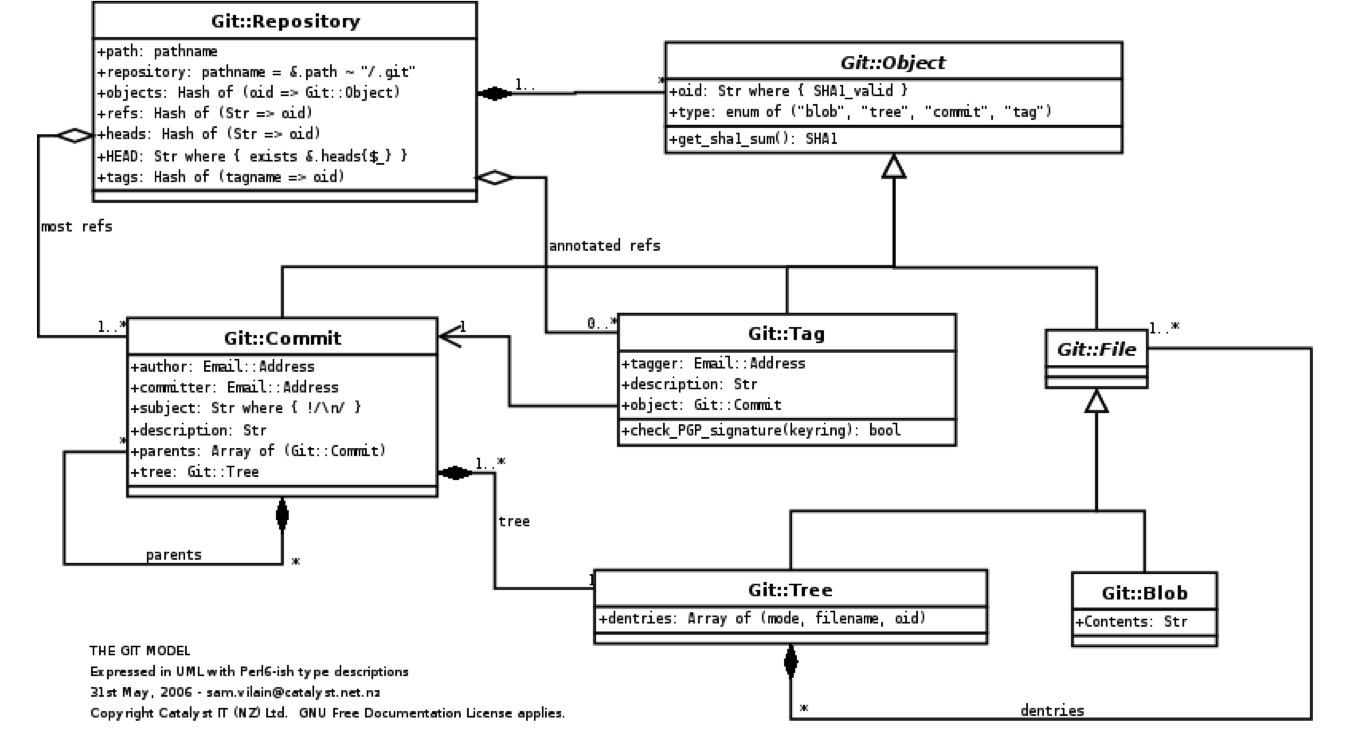
Not perfect, but here is an UML-like schema of what is said above
Aliases
git config --global alias.ci commit
git config --global alias.st status
git config --global alias.co checkout
git config --global alias.br branch
git config --global alias.lg "log --graph --pretty=format:'%Cred%h%Creset -%C(yellow)%d%Creset %s %Cgreen(%cr) %C(bold blue)<%an>%Creset' --abbrev-commit"
User setup
git config --global user.name "Romain Dorgueil"
git config --global user.email "romain@dorgueil.net"